Business Intelligence (BI)

Business Intelligence (BI) is a technology-driven software application that takes an important role in organization’s strategic decision using their raw data.  In other way, BI is most advanced version of our traditional statistics method we used in the past for analysis of data.  BI tools collect millions of data from different sources and execute advanced reports for business operations.  BI technologies provide historical, current and predictive views of business operations.  Organization use BI to improve decision making, cut operation costs and identify new business opportunities.  BI is more than just reporting tool, it provides informative instructions to CEO, CFO, CIO, COO, CMO, Directors and Managers to drive their current and future business.

Functions :

  • Reporting
  • Online analytical processing
  • Analytics
  • Data mining
  • Process mining
  • Complex event processing
  • Business performance management
  • Bench marking
  • Text mining
  • Predictive analytics
  • Prescriptive analytics
  • Easy interpretation of big data

Benefits :

  • Accelerating and improving decision making
  • Gaining competitive advantages
  • Optimizing internal business processes
  • Spot business problems
  • Increase operation efficiency
  • Driving new revenues
  • Identify market trends
  • Identify new business opportunities
  • Implementing effective strategy

Business Intelligence Software :

  • JasperReport
  • BIRT
  • Pentaho
  • Tableau
  • Microsoft Power BI
  • QlikView

How to reset Zyxel router ?

Reset Router

  1. Power on the router.
  2. Locate reset hole (It is usually appears back of the router, beside the power on/off switch).
  3. Push a pin or paper clip into the reset hole and hold it for 10 seconds (all LED lights will be flashed).
  4. Release the pin or paper clip from the hole.
  5. Wait for 2 to 3 minutes to complete the reset process. Once it is completed the router LED lights goes to steady mode.

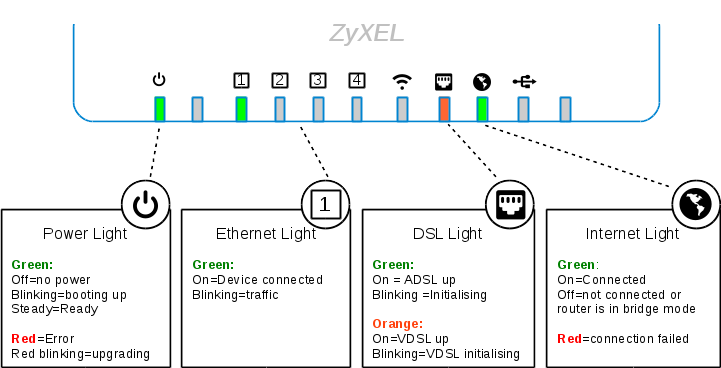
Lights Indicator

  • Power    –  Green   –              Solid
  • LAN       –  Green   –              Flash when traffic is going through mode
  • DSL        –  Green   –              Solid
  • Internet –  Green   –              Flash when traffic is going through modem

Why Linux desktop failed in desktop market ?

Linux is a opensource application. It’s not fare to compare with other commercial applications. Linux desktop market share is 2% compare to 90% of windows desktop market. But this comparison in the sever market is totally different, where as Linux OS server is running more than Windows Servers. The reason for Linux desktops hasn’t succeed due to the following:

  1. Too Many Distributions
    1. Windows and Mac OS have only one distribution at a time. Few years later will introduce another upgraded version.
    2. Linux has 500 active distribution in the market. There is no centralized management system for distribution.
    3. If all developers are focused to develop in one Linux distribution, today it got the gigantic power in the desktop market.
  2. Support
    1. Users feel support is very difficult in case anything wrong with OS. Where as Microsoft and Mac has trustworthy support team.
    2. Opensource support is time taking to resolve the issue.
  3. Graphics
    1. Linux focused on functions and failed to full fill the graphics requirement and Windows & Mac OS focused on graphics.
    2. User likes graphics than functions.
    3. Due to functions Linux server market is in high.
  4. Reluctant to change
    1. Since school/college/office/OEM version all are using Windows /mac as their default OS.
    2. People are familiar with this operating system software and not willing to change the other system.

IoT Asia Show

IoT Asia Show Opening Hours

  • Exhibition in Hall 1: 10:00am – 6:00pm daily
  • Conference in Hall 1*:
    • 9:00am – 6:00pm, Day 1, 29 March 2017
    • 8:00am – 5:35pm, Day 2, 30 March 2017 (8:00am – 9:30am for Analyst Breakfast Meetings attendees only) 

*Only for conference delegates. All lunch and networking breaks for conference delegates and speakers will be within the Exhibition Area in Hall 1, Singapore EXPO.

Registration Counters: MAX Atria Gallery, Level 1, Singapore EXPO (Registration closes at 5:30pm)

Internet of Things (IoT)

Internet of Things (IoT) is a concept to create a smart world by connecting everyday objects or things.  It makes an ordinary object (building, machine, plant, door, light-bulb, aircon, refrigerator  etc… ) into smart device by assigning an IP address for each objects or things.  In IoT concept, objects are placed with sensors and sensors are connected with internet connection to collect and exchange data, to and from the cloud server.

With this IoT, your home lightbulb can let you know when it needs to be replaced, aircon can let you know they need service and door can be controlled from remote location etc. This is power of IoT.

create a smart world,

with small objects,

to make life simple.

attocloud – be smart, be small & be simple.

What is PHP and why we use PHP Frameworks?

PHP (recursive acronym for PHP: Hypertext Pre-Processor) is free, widely-used open source general-purpose scripting language.  It is a very popular, secure and stable scripting language.

PHP framework is a library that makes the life of site developer easier by adding some useful functions. The usage of PHP frameworks is increasing day by day. The PHP frameworks let developers to initiate innovative modern website development practices.The general idea behind the workings of a PHP framework is referred to as Model View Controller(MVC).

Here are some top reasons for developers to adapt the best PHP frameworks and see how these top frameworks of PHP can level up the development process.

  • Speeding up the development process
  • Reusing code across similar projects
  • Web apps runs on PHP frameworks are scalable.
  • Stability
  • High level of security.
  • MVC pattern ensures the separation of presentation and logic.
  • Promote modern web development practices such as OOP.

How do I secure my wifi router from hackers/neighbours ?


  1. Login to Router Settings and Create Strong Password
  • Do not leave username as ‘admin’ change as you preferred and change password from ‘admin’ to strong password (combination of alphanumeric).
  1. Disable network SSID from broadcast
  • SSID is wireless network name. Disable SSID means neighbour can’t see your wireless network name in the list when they search.
  1. Create Strong WiFi Password
  • Creating strong WiFi password makes difficult to hack. Enable WiFi encryption as WPA2 Personal.
  1. MAC Address Filtering
  • Enable MAC address filtering allows registered devices allows access to your network.


How to setup Linksys router with a password?

Reset Router

  1. Power on the router.
  2. Locate reset hole (It is usually appears back of the router, beside the power on/off switch).
  3. Push a pin or paper clip into the reset hole and hold it for 10 seconds (all LED lights will be flashed).
  4. Release the pin or paper clip from the hole.
  5. Wait for 2 to 3 minutes to complete the reset process. Once it is completed the router LED lights goes to steady mode.

Login

Step 1: Open your browser (Firefox / Chrome/Internet Explorer / Safari)

Step 2: Type Linksys default IP address “192.168.1.1

Step 3: It prompts to type username and password.

Username: admin

Password: admin

Step 4: Click “OK

WiFi Settings

Step 5: Click “Wireless tab

Step 6: It brings to Configuration view – >Basic Wireless Settings.  Change the following configurations.

Select “Manual

Network mode: Mixed

                Network name (SSID):  <type your preferred name>

(It appears when you are connect to Wireless from your mobile)

SSID broadcast: Enabled

Step 7: Click “Save Settings

Step 8: It displays message as “Your settings have been successfully changed”.

Step 9: Click “Continue

Set Wireless Connection Password

Step 10: Click “Wireless Security” tab.

Step 11: Select Security mode as “WPA2 Personal

Step 12: Type wireless connection password. (Keep the password mixed with alphanumeric)

Step 13: Click “Save settings

Step 14: It display message as “Your settings have been successfully changed”.  Click “Continue”.

Set Linksys Router Password

Step 15: Click “Administration” tab and it brings to “Management” tab.

Step 16: Type your router password in “Router Password” and “Re-Enter to Confirm” boxes.

Step 17” Click “Save Settings

Note: Write down and keep your router password and wireless connection password in safe place.

How can I use my mobile 3G / 4G / Hotspot to provide internet access to my router?

Cradlepoint MBR1200B

This device solve your problem .  You can use your mobile hotspot to provide internet access to this device and access internet to your wired devices.  It helpful for small business or home users.

The Cradlepoint MBR1200B provides wired Ethernet, and 3G/4G wireless WAN connectivity to keep you and your business up and running.

Benefits:

  • Use as primary connection to the Internet with wired or wireless broadband.
  • Ensure against loss of productivity and business opportunity with automatic failover to 3G/4G when the wired connection is disrupted.
  • Load balance across the multiple wired and/or wireless connections when additional bandwidth is required.

https://cradlepoint.com/products/mbr1200b#!desc